Write your novel
in the terminal.
1667 asks a model for the next paragraph, then keeps every take it gives you side by side on a tree you can walk back through. Your keys, your endpoint, your files on your disk. No analytics, no telemetry, no account anywhere in the source.
curl -fsSL https://1667.ai/install.sh | shpowershell -ExecutionPolicy Bypass -c "irm https://1667.ai/install.ps1 | iex"npm install --global @1667-ai/cli@latestgit clone https://github.com/1667-ai/1667.gitcd 1667 && npm cicd tui && bun install --frozen-lockfile && bun startInstalls 1667 0.10.2. Supports macOS arm64/x64 and glibc 2.17+ Linux arm64/x64. Run 1667 upgrade for later managed releases.
Installs 1667 0.10.2 on Windows x64. Exit 1667 and run this command again to install a later release.
Needs Node 22. npm manages this installation. Use npm to install later releases.
Needs Bun 1.3.14 or later, and Node 22. Git manages this installation.
verify the installer first
This optional path needs GitHub CLI. It verifies version 0.10.2 before it runs the local file.
d=$(mktemp -d) && (trap 'rm -rf "$d"' EXIT && cd "$d" && gh release download v0.10.2 --repo github.com/1667-ai/1667 --pattern install-stable.sh && gh attestation verify install-stable.sh --hostname github.com --repo 1667-ai/1667 --signer-workflow 1667-ai/1667/.github/workflows/release-npm.yml --source-ref refs/tags/v0.10.2 --source-digest 75006abd19884944df48b16bc2f1b4869d9f3c8a --deny-self-hosted-runners && sh install-stable.sh)$d=Join-Path ([IO.Path]::GetTempPath()) ([Guid]::NewGuid()); New-Item -ItemType Directory -Path $d | Out-Null; try { gh release download v0.10.2 --repo 1667-ai/1667 --pattern install-stable.ps1 --dir $d; if ($LASTEXITCODE -ne 0) { throw 'GitHub release download failed.' }; gh attestation verify (Join-Path $d 'install-stable.ps1') --hostname github.com --repo 1667-ai/1667 --signer-workflow 1667-ai/1667/.github/workflows/release-npm.yml --source-ref refs/tags/v0.10.2 --source-digest 75006abd19884944df48b16bc2f1b4869d9f3c8a --deny-self-hosted-runners; if ($LASTEXITCODE -ne 0) { throw 'GitHub attestation verification failed.' }; powershell -ExecutionPolicy Bypass -File (Join-Path $d 'install-stable.ps1'); if ($LASTEXITCODE -ne 0) { throw '1667 install failed.' } } finally { Remove-Item -LiteralPath $d -Recurse -Force }- macOS · Linux · Windows
- no account
- no telemetry
- Apache-2.0
drag or use arrow keys to pan
Fullscreen unavailable.Open the demo video →
1667 homepage demo

The opening write view shows “The lantern keeper,” chapter three, parts 11
through 13. Part 12 is on take 3 of 5:

“He did not move toward the stairs. Instead he set the brass compass on the bar
between them, and its needle went around twice, slow, like a dog deciding
whether to lie down, and stopped pointing at Maren. ‘Has the cliff road ever
been walked at night without a light?’ he asked. ‘Not by anyone who came back,’
she said. The needle shivered and held.”

Compose: Enter opens the composer. The direction “let the unlit lantern answer”
is typed and submitted. The generated next part reads: “The lantern flame bent
toward the compass, though no door had opened.” The program then waits.

Compare takes: Up moves back through story parts to the five-take passage. Left
and Right compare sibling takes without removing any of them.

Explore the path map: M opens one row per story part. Circles show sibling
takes, the selected take is highlighted, and word counts sit at the right.
Arrow keys move through parts and takes before Escape returns to the story.

Every key in one place: Question mark opens this complete reference, then Page
Down shows the remaining commands:

1667 key reference

MOVE — read and navigate
↑ ↓: previous or next row
← →: flip between takes
Shift+↑ Shift+↓: nudge the page a line
Page Up or Control+U: page up
Page Down or Control+D: page down
G or Shift+G: first or last part
[ ]: previous or next chapter
U: undo a chapter break addition or removal

WRITE — make the next part
Space: continue this part
Enter or I: type what happens next
R: retake with the same prompt
Shift+R: retake and edit the prompt
W: write a take yourself
E: edit prose and prompt
Y or Shift+Y: copy the part or whole line
Control+↑ Control+↓: previous prompts in Direct
N: start a new story

OPEN — panels and views
M: map of the whole story
F: facts kept for context
O: switch story or open the library
Colon or Control+P: command palette
Comma: generation settings
Control+G: wide context details
Question mark: this key reference
Escape: close what is open
Q: quit 1667

SHAPE — arrange what exists
D: delete this take and everything below it on the current line
T: tag the line here
C or Shift+C: chapters or end one here
X: actions for this part
P: show or hide directions
Z: typewriter mode
Shift+F: facts rail, automatic or off

MAP — while the map is open
M: cycle path, tree, and mass
A: all takes or sketches
Enter: reroute a node or sketch
L: follow a tree line or open a mass line
S: tree to mass, or cycle mass sorts
D or T: prune, tag, or change the path

Chapter rows differ; the line below the story explains the active row.
Drag selects, Control+C copies, and Escape closes.
Press Enter to open the composer, type what happens next, and press Enter again to generate the next story part.
Up and down select a story part; left and right select one of its sibling takes without deleting the others.
The path map shows one row per part, sibling takes as circles, and word counts at right; the arrow keys move its cursor.
Press ? to open the complete keyboard reference, then use Page Down to read the remaining commands.
What it is
It drafts. You decide what stays.
You move through a manuscript, and the model writes a paragraph when you ask it to. Then it stops and waits for you.
Ask again, keep both
Ask for another version of a paragraph and the one you were reading stays where it is. The new take sits beside it, and ← and → flip between them. Every take you generate stays on the tree, and d is the only thing that removes one.
The shape is a tree
A story is a tree of parts and takes. The story line is the path you have selected through it. Branches you walked away from are still there, and still yours to come back to.
It lives in a folder
Stories sit in a directory you chose. Export writes Markdown next to them. There is no server to sign in to and nothing to migrate off later.
The tree
Every draft you didn't keep, still there.
Ask for another take and the one you were reading does not go anywhere. It becomes a sibling. Press m and the shape of the whole thing opens up: the line you are on, the forks you made, and the paragraphs you wrote once and walked away from.
Three views, cycled with the same key. Nothing is archived, nothing is pruned on your behalf, and d is the only thing that removes a take.
- path
- The story line as it reads now. One row per part, sibling takes as rings beside it, word counts down the right.
- tree
- Every fork you have made, with the quiet runs between them collapsed. Cold branches fold away, and l opens the one you pick.
- mass
- The same story by weight. Lines you kept writing, set against the ones you abandoned after a paragraph.
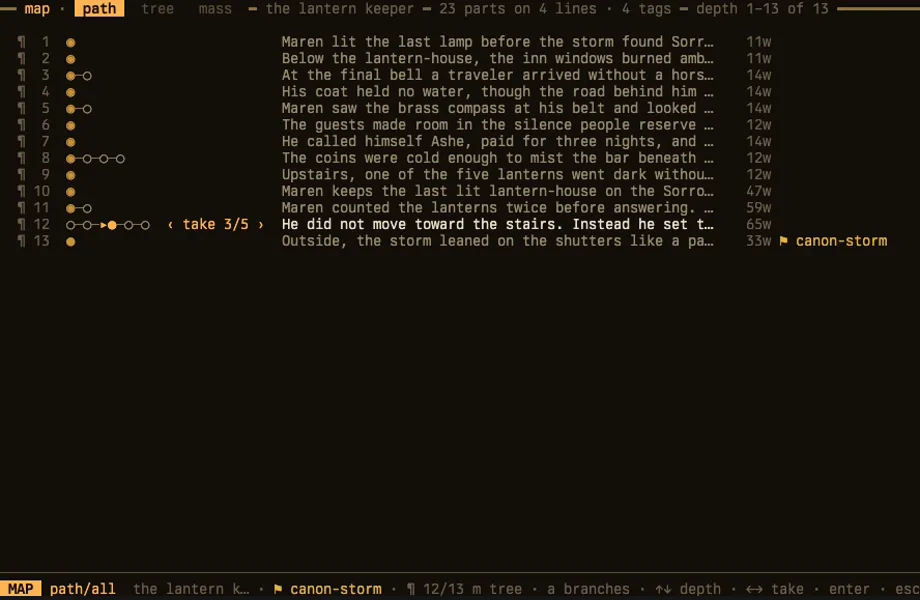
drag or use arrow keys to pan
Path map for “The lantern keeper.”
Depth 1 through 13; 23 parts across 4 story lines.
One row represents each selected story part. Circles beside rows 3, 5, 8, 11,
and 12 show sibling takes. Part 12 is selected at take 3 of 5; part 13 carries
the canon-storm tag. The clip moves to adjacent parts, returns to part 12,
compares its sibling takes, then returns to take 3.
Controls: Up and Down move by depth; Left and Right change take; Escape closes.
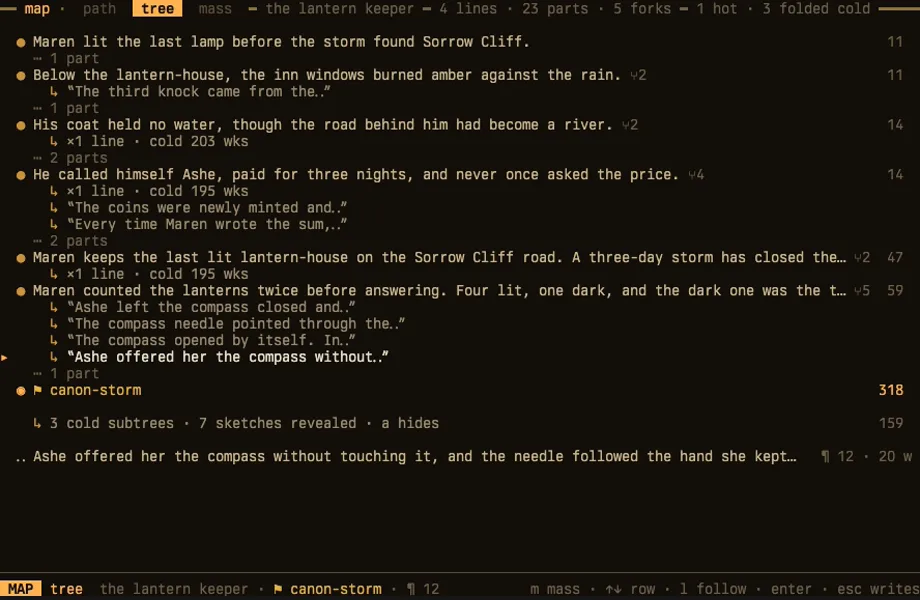
drag or use arrow keys to pan
Tree map for “The lantern keeper.”
The story contains 4 lines, 23 parts, and 5 forks. The visible trunk shows six
passage rows, three folded cold single-line branches, and seven revealed
sketches. The cursor begins on the sketch “Ashe offered her the compass
without…” beneath “Maren counted the lanterns twice.” The clip moves up two
visible rows, then down two rows to return to that sketch.
Controls: Up and Down move by row; L follows a line; M opens mass; Escape closes.
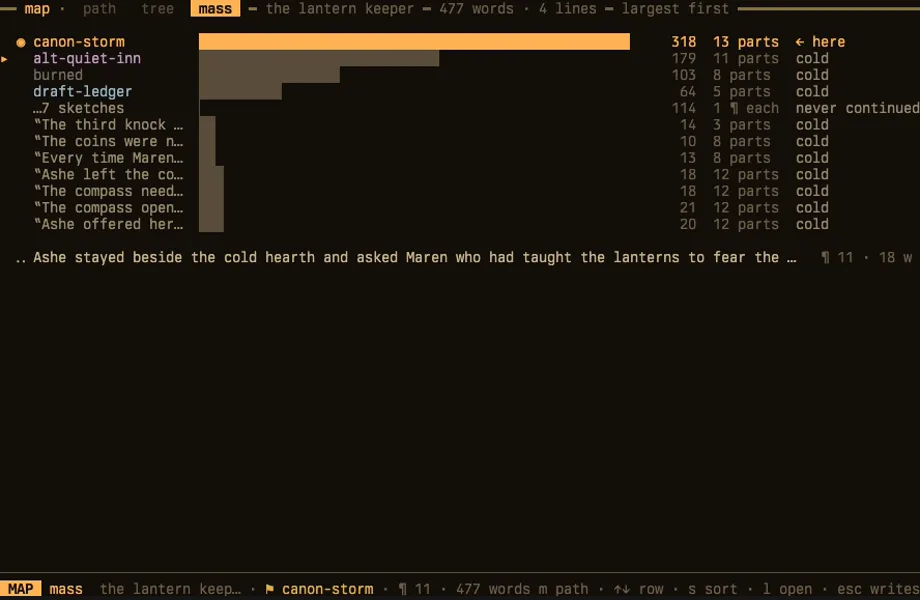
drag or use arrow keys to pan
Mass map for “The lantern keeper.”
The story contains 477 words across 4 lines. Horizontal bars compare
canon-storm, alt-quiet-inn, burned, draft-ledger, seven sketches, and the cold
single-paragraph branches by word count. The clip moves between lines, then
cycles the largest, recent, deepest, and alphabetical sorts before returning
to largest.
Controls: Up and Down move by row; S changes sort; L opens a line; M returns to
path; Escape closes.
No tracking. At all.
Nothing in here is watching you write.
Every line below describes code that does not exist. Go and check.
- analyticsno library, no endpoint, no events
- telemetrynothing is measured and sent
- crash reportererrors go to a local log you can read
- install idnothing identifies your machine
- accountthere is nothing to sign in to
Every request the program makes goes to the endpoint you configured. Nothing comes to us, because there is no server of ours to send it to.
One exception: a background update check reads public package metadata from the npm registry. It sends no story, prompt, account, or settings data. Turn it off in Settings to disable the check.
- No account, ever. Nothing to create, nothing to delete.
- We never see your prose. It goes to the provider you chose, and their policy is the one that governs it.
- Apache-2.0 source. Every claim on this page is one you can check.
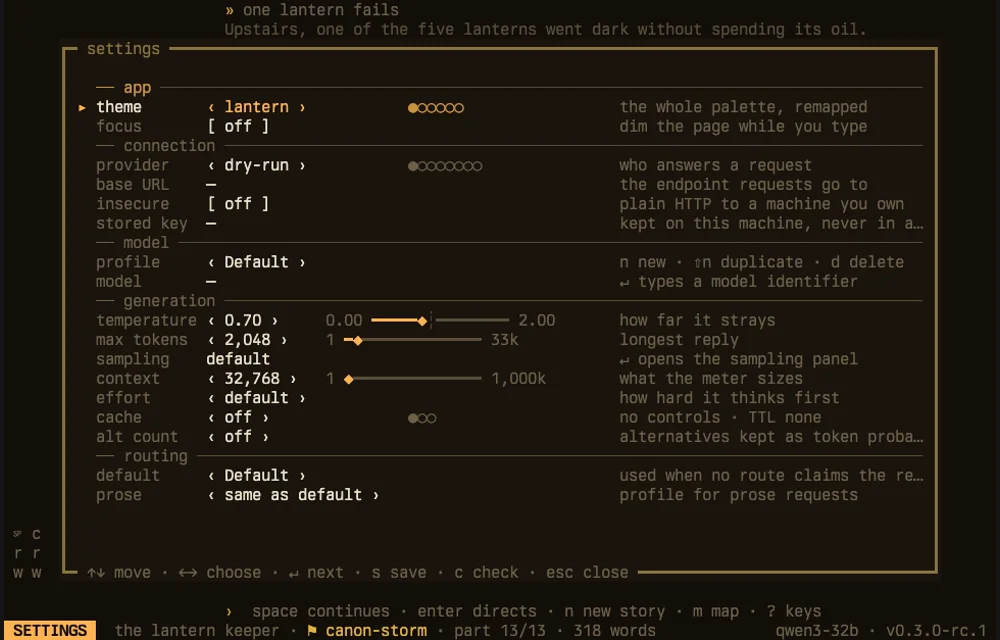
drag or use arrow keys to pan
1667 generation settings

Theme: lantern
Compose focus: off
Provider: dry-run
Base URL: not set
Insecure HTTP to a machine you own: off
Stored key: not set
Profile: Default
Model: not set
Temperature: 0.7
Maximum tokens: 2,048
Sampling: default
Context window: 32,768
Effort: default
Cache policy: off; no controls; no time to live
Alternate token-probability count: off
Default route: Default profile
Prose route: same as default

Controls: Up and Down move; Left and Right choose; Enter advances; S saves;
C checks; Escape closes.
Every destination the program knows about is on this panel, and you put it there. Captured in demo mode, so the connection reads dry-run.
Models
Your keys. Your prose style. Your machine.
1667 includes no model and rents you nothing. Point it at a provider you already pay, or at a model running on your own computer. The request goes straight there.
generation
defaults, editable behind ,
- OpenAI
- Anthropic
- OpenRouter
- Ollama
- LM Studio
- llama.cpp
- KoboldCpp
- Custom endpoint
Your stories stay in plain text files on your computer. Your key goes in a private file that only you can read, never into the story folder.
Already writing elsewhere? Move from SillyTavern or move from NovelAI.
Keys
Learn six. The rest find you.
These eight cover a whole writing session. There are about 40 in total and ? shows you the rest, but nothing below this line is needed to finish a chapter.
- continueWrite the next part from here
- directSay what happens next, then continue
- flip takesMove between siblings of this part
- movePrevious and next part
- retakeAnother take on the same prompt
- writeAdd a take in your own words
- editOpen the part in the full-screen editor
- mapCycle path, tree, and mass
and the program shows you the rest
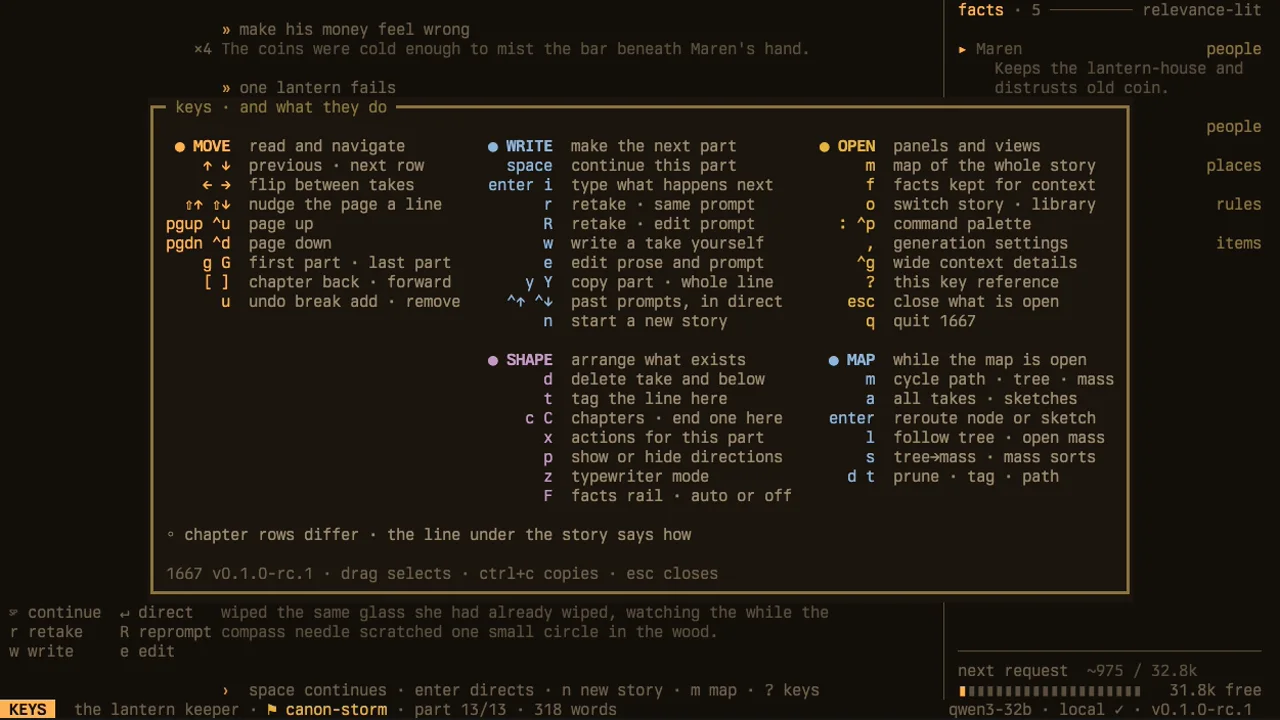
drag or use arrow keys to pan
1667 key reference

MOVE — read and navigate
↑ ↓: previous or next row
← →: flip between takes
Shift+↑ Shift+↓: nudge the page a line
Page Up or Control+U: page up
Page Down or Control+D: page down
G or Shift+G: first or last part
[ ]: previous or next chapter
U: undo a chapter break addition or removal

WRITE — make the next part
Space: continue this part
Enter or I: type what happens next
R: retake with the same prompt
Shift+R: retake and edit the prompt
W: write a take yourself
E: edit prose and prompt
Y or Shift+Y: copy the part or whole line
Control+↑ Control+↓: previous prompts in Direct
N: start a new story

OPEN — panels and views
M: map of the whole story
F: facts kept for context
O: switch story or open the library
Colon or Control+P: command palette
Comma: generation settings
Control+G: wide context details
Question mark: this key reference
Escape: close what is open
Q: quit 1667

SHAPE — arrange what exists
D: delete this take and everything below it on the current line
T: tag the line here
C or Shift+C: chapters or end one here
X: actions for this part
P: show or hide directions
Z: typewriter mode
Shift+F: facts rail, automatic or off

MAP — while the map is open
M: cycle path, tree, and mass
A: all takes or sketches
Enter: reroute a node or sketch
L: follow a tree line or open a mass line
S: tree to mass, or cycle mass sorts
D or T: prune, tag, or change the path

Chapter rows differ; the line below the story explains the active row.
Drag selects, Control+C copies, and Escape closes.
What we didn't build
Left out on purpose.
Each of these was considered and turned down.
No telemetry
No analytics, no crash reporter, no install id. There is no such code.
No cloud
No sync, no server of ours. Stories never leave the folder they are in.
No ghost autocomplete
Nothing is generated until you press a key that asks for it.
No chat sidebar
Type an instruction, get a paragraph. There is no thread to scroll back.
FAQ
Questions worth answering.
Does it write the book for me?
No. It writes a paragraph when you ask for one, in the direction you gave it, and then it stops and waits. You choose the take, you cut the line, you decide what the chapter is. The judgement stays yours.
What happens to the takes I don't use?
They stay. Every take is written to the tree the moment it exists, and moving to another one changes nothing about it. The map shows you all of them, including the lines you abandoned after a single paragraph. Only d removes a take.
Is anything collected about me?
No. There is no analytics code, no telemetry, no crash reporter and no install id in the source. Every request the program makes goes to the endpoint you configured, with one exception: an optional update check, which reads public package metadata from the npm registry. It sends no story, prompt, account or configuration data. Turn it off in Settings to disable the check.
Why 1667?
1,667 words a day for thirty days is fifty thousand, which is the pace that finishes a first draft. The number names that pace. Nothing in the program tracks whether you hit it.
Where does my writing live?
In a folder you chose. Run 1667 init in ~/book and that is your project. Export writes the selected story line to Markdown in the same place. Back it up like any other directory. There is no export step to be trapped behind.
Which models can I use?
Anything behind an OpenAI or Anthropic compatible endpoint. Presets ship for OpenAI, Anthropic, OpenRouter, Ollama, LM Studio, llama.cpp, KoboldCpp, and a custom endpoint. Keys are stored in a private file on your machine and sent only to the provider they belong to. A model running locally needs no key at all.
Do I need to be good at the terminal?
You need to be able to open one. After that it is arrow keys to move, space to continue, and ? for the rest. There is no shell scripting and no configuration file to hand-edit. Settings are a panel behind the comma key.
Can I run it on Windows?
Yes. The native Windows x64 release uses the PowerShell Installer. Exit 1667 and run the same command again for a later release.
What does it cost?
Nothing. It is Apache-2.0 source with no paid tier, because there is no server to pay for. You pay whatever your model provider charges, directly to them, or nothing at all if you run a model locally.
1,667 words. Tonight.
Open a folder, run it, and write the next paragraph.
curl -fsSL https://1667.ai/install.sh | shpowershell -ExecutionPolicy Bypass -c "irm https://1667.ai/install.ps1 | iex"npm install --global @1667-ai/cli@latestgit clone https://github.com/1667-ai/1667.gitcd 1667 && npm cicd tui && bun install --frozen-lockfile && bun startInstalls 1667 0.10.2. Supports macOS arm64/x64 and glibc 2.17+ Linux arm64/x64. Run 1667 upgrade for later managed releases.
Installs 1667 0.10.2 on Windows x64. Exit 1667 and run this command again to install a later release.
Needs Node 22. npm manages this installation. Use npm to install later releases.
Needs Bun 1.3.14 or later, and Node 22. Git manages this installation.
verify the installer first
This optional path needs GitHub CLI. It verifies version 0.10.2 before it runs the local file.
d=$(mktemp -d) && (trap 'rm -rf "$d"' EXIT && cd "$d" && gh release download v0.10.2 --repo github.com/1667-ai/1667 --pattern install-stable.sh && gh attestation verify install-stable.sh --hostname github.com --repo 1667-ai/1667 --signer-workflow 1667-ai/1667/.github/workflows/release-npm.yml --source-ref refs/tags/v0.10.2 --source-digest 75006abd19884944df48b16bc2f1b4869d9f3c8a --deny-self-hosted-runners && sh install-stable.sh)$d=Join-Path ([IO.Path]::GetTempPath()) ([Guid]::NewGuid()); New-Item -ItemType Directory -Path $d | Out-Null; try { gh release download v0.10.2 --repo 1667-ai/1667 --pattern install-stable.ps1 --dir $d; if ($LASTEXITCODE -ne 0) { throw 'GitHub release download failed.' }; gh attestation verify (Join-Path $d 'install-stable.ps1') --hostname github.com --repo 1667-ai/1667 --signer-workflow 1667-ai/1667/.github/workflows/release-npm.yml --source-ref refs/tags/v0.10.2 --source-digest 75006abd19884944df48b16bc2f1b4869d9f3c8a --deny-self-hosted-runners; if ($LASTEXITCODE -ne 0) { throw 'GitHub attestation verification failed.' }; powershell -ExecutionPolicy Bypass -File (Join-Path $d 'install-stable.ps1'); if ($LASTEXITCODE -ne 0) { throw '1667 install failed.' } } finally { Remove-Item -LiteralPath $d -Recurse -Force }